A box in their own size
Not a photo of a sample but a model of their exact box: flat, open, closed, with a folding slider.
- flat
- open
- closed
Beta craftgen · boxes
Customers don’t order a box they haven’t seen. So let them see it: they enter the size and within seconds spin the box in 3D, place it on their desk in AR and see the die-cut template. You receive ready sizes and the board grade.
Beta. Box types, sizes and board grades are yours.
A mock-up of a manufacturer’s website, unbranded. Inside is a real box from the service: rotate it with mouse or finger, fold it with the slider, switch box types.
Box configurator
The things that usually take dozens of emails asking “can you show me what it will look like?”.
Not a photo of a sample but a model of their exact box: flat, open, closed, with a folding slider.
iPhone opens the box in Quick Look, Android in Scene Viewer. The customer puts it next to the product and sees whether it fits.
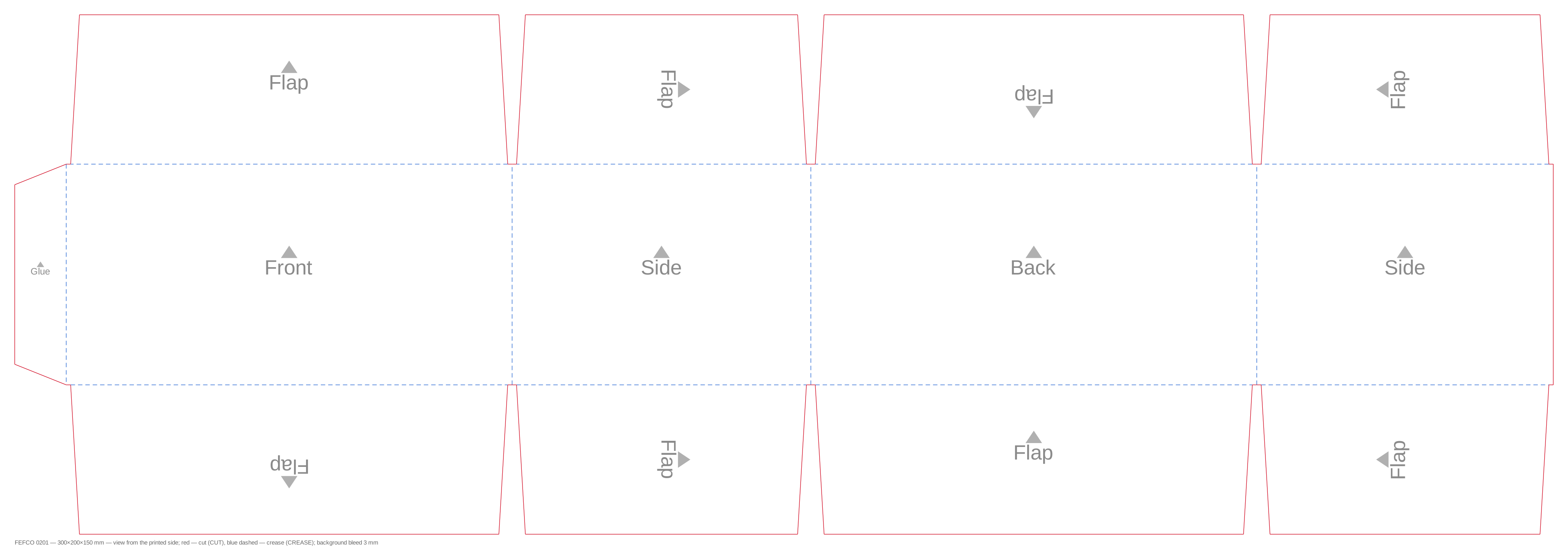
Cut and crease lines on separate layers, board thickness accounted for in the flat.
dieline.svg dieline.dxf RSC 0201
Fewer “how much for a little 30 by 20 box?” — more requests your technologist can work with straight away.
The customer sends a link to their box — it already has everything you need to quote.
Data from this box’s box.json. Switch the type in the mock-up above.
One code for three platforms. We add your domain to the allow list — the embed won’t open on anyone else’s site.
Block T123 “HTML code” → paste.
The configurator has 12 box styles today. We keep the ones you make, with your size ranges and grades.
| Code | Style | Size, mm | Material |
|---|
A sales manager asks an assistant for “a 400×300×200 box in B flute” — and gets 3D, AR and a die-cut template from the same service.
https://boxes.craftgen.app/mcpThe model and template are built on the server for every size; there are no pre-made “similar box” stand-ins.
Flute grades in the configurator — thickness to scale
Server generation time — measured 09.10.2026. Thicknesses from the service’s limits.json.
Four steps. No developer needed on your side — access to your site editor is enough.
Your website, platform and the boxes you make.
Box types, size ranges, board grades and look.
Your domain on the allow list, the code in a site block.
Customers build their boxes, you quote the orders.
Beta. Box types, sizes and board grades are yours. Your email app opens with a ready-made message.
craftgen · boxes
A 3D box configurator on your factory’s website
Customers don’t order a box they haven’t seen. Your sizes — 3D, AR and a die-cut template in seconds.
Put it on your siteBeta. Box types, sizes and board grades are yours.
01 · on your customer’s phone
Rotate with a finger, fold with the slider. Outside the 3D view the page scrolls as usual.
02 · your customer
A model of their exact box: flat, open, closed, with a folding slider.
iPhone — Quick Look, Android — Scene Viewer. They put it next to the product and see whether it fits.
Cut and crease lines on separate layers, board thickness built into the flat.
03 · you
The customer sends a link to their box — it has everything you need to quote.
Tilda, WordPress, Shopify — one code. Your domain on the allow list.
Block T123 “HTML code” → paste.
12 box styles in the configurator — we keep yours, with your ranges and grades.
The assistant builds a box at a sales manager’s request: 3D, AR, template.
https://boxes.craftgen.app/mcpFlute grades — thickness to scale
Server-side generation, measured 09.10.2026. Thicknesses from limits.json.
04 · setup
Your email app opens with a ready-made message.
