boxes · craftgen

Pizzerias · delivery · cafés

See your box with your logo — before the print run

Before you call the printer: logo on the lid, 3D, AR on your table and a ready dieline to show them.

Build your pizza box

The builder is free. Beta: check board, tolerances, price and run size with your printer.
Live box

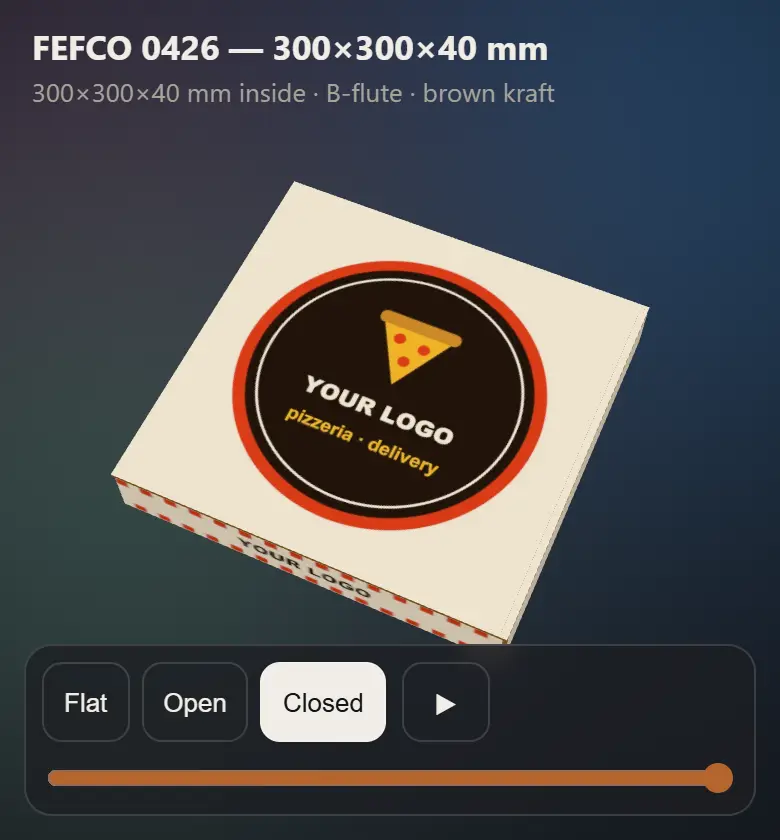
Pizza box with “YOUR LOGO” on the lid — a frame of the live 3D box

This is a real box from the service: FEFCO 0426, 300×300×40 mm, B-flute. “YOUR LOGO” is a placeholder — your file goes there. Rotate it, open it, unfold it.

How it usually goes

TICKET 01

A call to the printer

You describe the box in words. How the logo sits on the lid — you find out when the boxes arrive.

TICKET 02

Run and plates up front

Flexo pays off on big batches — so you pay before you’ve held a single box.

TICKET 03

Kraft and a sticker

Quick and safe. But someone sticks every label by hand, and the brand looks temporary.

Instead: build it yourself, like an order in the kitchen

ORDER · FEFCO 0426
SIZE150–600 × 150–600 mm, height 25–100
PRESETS300×300×40 · 350×350×40 · 400×400×40 · 500×500×45
FLUTEF, E (micro) · B · C · BC
FINISHkraft · white · black
PRINTa name up to 24 characters or your artwork up to 8 MB
PICK-UP3D · AR · SVG and DXF dieline
Ready for the printer

What you show the printer

The dieline of the very box spinning above: your artwork, cut and crease lines — in the same coordinates.

Box print on the flat sheet: logo on the lid, a stripe on the front wall Die-cut template of box 0426: red is cut, blue dashed is crease
  • Die-cut template in SVG and DXF: cut and crease as separate lines.
  • Blank sheet 476×765 mm, box outside 318×309×46 mm.
  • A PNG underlay with panel labels — your designer just draws on top.
  • A link to the 3D and AR — the printer sees exactly what you want.

Price, minimum run and lead time come from the printer. You walk in with a file, not a phone description.

Who it is for

Pizzeria
A box for your own diameter — from 150 to 600 mm, not the closest one in a catalogue.
Delivery
Your logo printed on every order, not a sticker someone has to put on.
Café
Pastries and sandwiches to go — the same 0426 with a low wall from 25 mm.

12 seconds: from kraft with a sticker to your own box

Three steps in the builder

  1. Size and flute. A preset in one tap, or your own millimetres.
  2. Logo. A name on a colour — or download the underlay, place your logo and upload a PNG, JPEG or WebP.
  3. Check it and take it. Rotate it in 3D, put it on your table in AR, download the dieline for the printer.

Your artwork becomes part of a box behind a link: anyone with the link can see the print.

Show the printer a box, not a description

A few minutes in the builder — and the printer gets a ready dieline with your logo.

Build your pizza box

The builder is free. Beta: check board, tolerances, price and run size with your printer.

boxes · craftgen

Pizzerias · delivery · cafés

See your box with your logo — before the print run

You usually can’t see a branded pizza box until you call the print shop, and flexo printing means a run and plates paid up front. So people buy kraft and slap a sticker on it. Build yours here: logo on the lid, 3D, AR on your table — and a ready dieline you can show the printer.

Build your pizza box

The builder is free. Beta: check board, tolerances, price and run size with your printer.

This is a real box from the service: FEFCO 0426, 300×300×40 mm, B-flute. “YOUR LOGO” is a placeholder — your file goes there. Rotate it, open it, unfold it.

How it usually goes

TICKET 01

A call to the printer

You describe the box in words. How the logo sits on the lid — you find out when the boxes arrive.

TICKET 02

Run and plates up front

Flexo pays off on big batches — so you pay before you’ve held a single box.

TICKET 03

Kraft and a sticker

Quick and safe. But someone sticks every label by hand, and the brand looks temporary.

Instead: build it yourself, like an order in the kitchen

ORDER · FEFCO 0426
SIZE150–600 × 150–600 mm, height 25–100
PRESETS300×300×40 · 350×350×40 · 400×400×40 · 500×500×45
FLUTEF, E (micro) · B · C · BC
FINISHkraft · white · black
PRINTa name up to 24 characters or your artwork up to 8 MB
PICK-UP3D · AR · SVG and DXF dieline
Ready for the printer

Three steps in the builder

  1. Size and flute. A preset in one tap, or your own millimetres.
  2. Logo. A name on a colour — or download the underlay, place your logo and upload a PNG, JPEG or WebP.
  3. Check it and take it. Rotate it in 3D, put it on your table in AR, download the dieline for the printer.

Your artwork becomes part of a box behind a link: anyone with the link can see the print.

What you show the printer

The dieline of the very box spinning above: your artwork, cut and crease lines — in the same coordinates.

Box print on the flat sheet: logo on the lid, a stripe on the front wall Die-cut template of box 0426: red is cut, blue dashed is crease
  • Die-cut template in SVG and DXF: cut and crease as separate lines.
  • Blank sheet 476×765 mm, box outside 318×309×46 mm.
  • A PNG underlay with panel labels — your designer just draws on top.
  • A link to the 3D and AR — the printer sees exactly what you want.

Price, minimum run and lead time come from the printer. You walk in with a file, not a phone description.

12 seconds: from kraft with a sticker to your own box

Pizzeria
A box for your own diameter — from 150 to 600 mm, not the closest one in a catalogue.
Delivery
Your logo printed on every order, not a sticker someone has to put on.
Café
Pastries and sandwiches to go — the same 0426 with a low wall from 25 mm.

Who it is for

Show the printer a box, not a description

A few minutes in the builder — and the printer gets a ready dieline with your logo.

Build your pizza box

The builder is free. Beta: check board, tolerances, price and run size with your printer.