craftgen · boxes Create your box

Mailer box 0427 · your artwork · 3D and AR

See yourboxbefore the print run

The print run arrived — and the logo is upside down. Mistakes like this only show up in your hands, after the money is already spent. Here you spin the box with your artwork before print: every side, open and closed — then place it on your desk through your phone camera.

Create your box

Free during beta. On-screen colour is a guide, not a proof.

Opening the box…
Live 3D from the service · demo print · 250×180×80 mm inside · drag to rotate

Scene 1 · unboxing

The print run arrived.

You open the first box…

The logo is upside down.

Because a flat sheet isn’t a box.

This is the service’s real template for box 0427. Look at the back panel label: on the flat sheet the back panel lies upside down. Place your logo “straight” on the sheet — and on the folded box it ends up upside down. The configurator lays your artwork on the same dieline as the 3D model, so you spot the mistake right away, not in the print run.
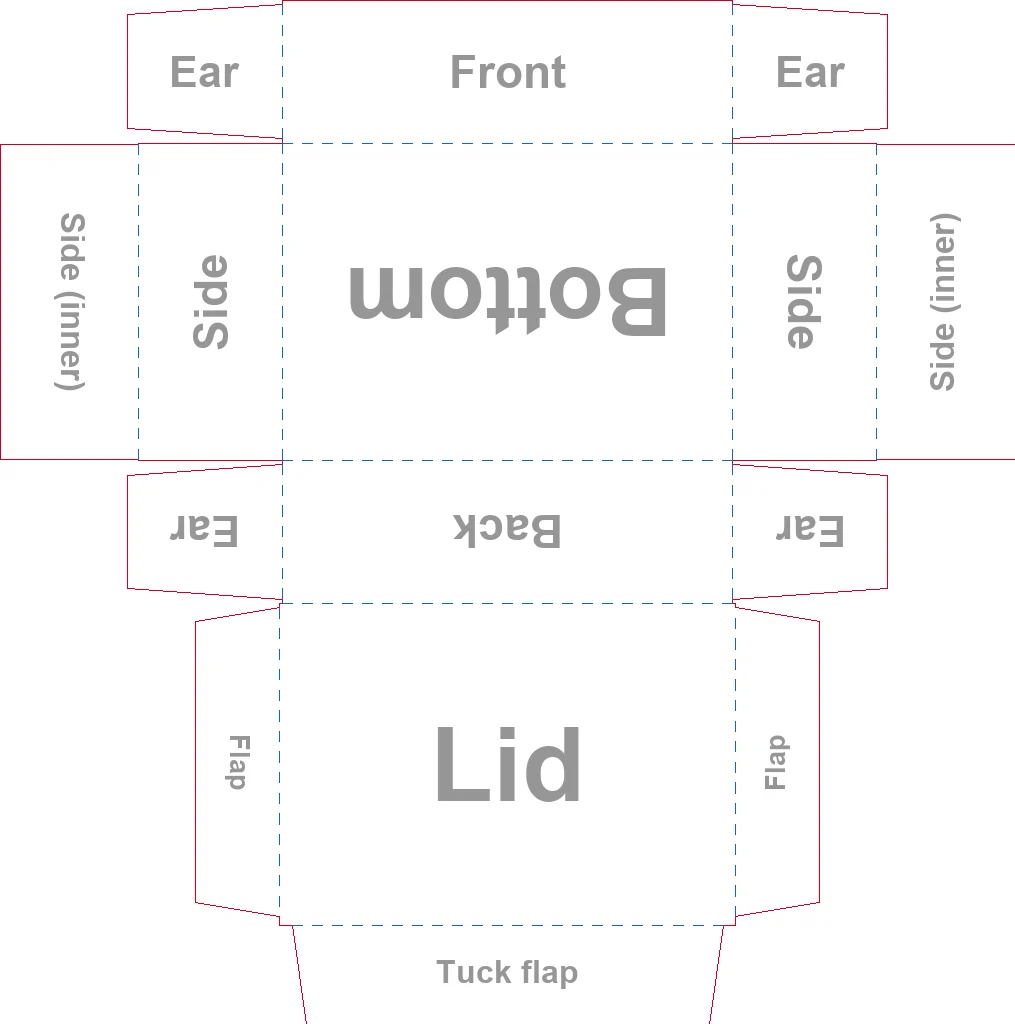
Flat dieline of mailer box 0427 with panel labels: front, bottom, back, lid, sides, ears, flaps, tuck flap. The Bottom and Back labels are upside down. upside down on the boxturned the right way

The configurator gives you a template for your size — PNG and SVG for your designer.

Scene 2 · the film

From artwork to a box on your desk — 12 seconds

Scene 3 · three steps

Upload artwork → see every side → AR on your desk

Preparing the dieline…
Flat: turn the sheet to see the print

Your artwork on the box in 3D and AR:every side before print.

  • Any sizeFrom 20 to 2000 mm inside on each side. Ready-made: 200×150×60, 250×180×80, 350×250×100 mm.
  • BoardF and E microflute, B and C flute, BC double wall — board thickness is included in the outer dimensions.
  • FinishBrown kraft, white coated, matte black — or one of 14 colours on the outside.
  • For your printerSVG and DXF die-cut template: cut and crease lines at the same dimensions.
  • For your storeEmbed code — a 3D box on your product page: Tilda, WordPress, Shopify.
  • HonestlyOn-screen colour is a guide. Your artwork becomes part of the box behind its link: the address can’t be guessed, but anyone who has the link sees the print.

See it first.Then print.

Create your box

Free during beta. On-screen colour is a guide, not a proof.

craftgen · boxesbeta

Mailer box · your logo

See yourboxbefore the print run

The print run arrived — and the logo is upside down? Check your artwork on the box in 3D and in AR on your desk, while nothing has been printed yet.

Create your box

Free during beta. On-screen colour is a guide, not a proof.

Opening the box…
Live 3D · demo print · spin with your finger

Unboxing

The print run arrived.The logo isupside down.

Flat dieline of mailer box 0427: the Bottom and Back labels are upside down. upside downright way

The real template for box 0427: the back panel lies upside down on the sheet. Logo “straight” on the sheet — upside down on the box. In the configurator you see it in 3D right away.

12 seconds: from artwork to desk

Three steps

Preparing the dieline…
Flat: turn the sheet to see the print
  1. 01Upload your artworkPNG, JPEG or WebP up to 8 MB. The configurator gives you a template for your size. From 2000 px on the long side — no warnings.
  2. 02See every sideYour artwork goes on the outside. Fold it with the slider and spin it: lid, sides, back, flaps.
  3. 03AR on your deskThe AR button in the model window places the box on your desk at actual size: iPhone or Android.

Your artwork on the box in 3D and AR: every side before print.

  • Sizes20…2000 mm inside; ready-made 200×150×60, 250×180×80, 350×250×100
  • BoardF, E microflute · B, C flute · BC double wall
  • Finishkraft, white, black or 14 colours outside
  • For printersSVG and DXF die-cut template
  • For stores3D embed code for your product page
  • Honestlycolour is a guide; anyone with the box link can see your artwork

See it first.Then print.

Create your box

Free during beta. On-screen colour is a guide, not a proof.